


Download 10 free QuickBooks Chart of Accounts template for Quickbooks and Excel designed for Shopify businesses.
Whether you run a dropshipping store, print-on-demand business, clothing brand, or digital products shop, these templates help you organize your bookkeeping from day one.
One of the first accounting decisions every Shopify business owner needs to make is how to organize their Chart of Accounts (COA). A well-designed COA makes it easier to reconcile Shopify payouts, track profitability, prepare for tax season, and understand where your money is going.
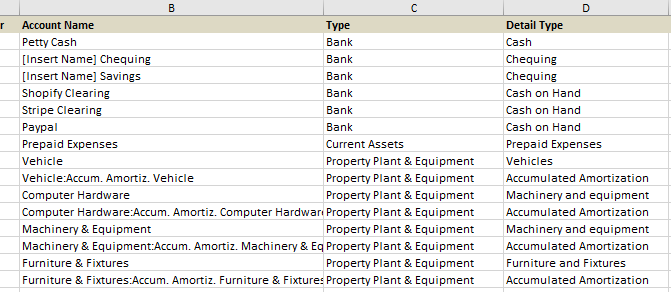
To help you get started, we’ve created free Shopify Chart of Accounts templates designed specifically for QuickBooks Online users. Whether you’re just launching your store or cleaning up an existing bookkeeping system, these templates provide a solid foundation that you can customize to fit your business.
Download Includes:
- QuickBooks account types included
- Shopify clearing & merchant fee accounts
- Business specific chart of account
- Ready and easy to customize
- Ready to upload into Quickbooks
- Chart of accounts
- Editable excel and google sheet download
What Is a Chart of Accounts?
A Chart of Accounts is simply a list of every account your business uses to record financial transactions.
Instead of recording every sale or expense in one large bucket, QuickBooks organizes transactions into categories such as:
- Assets
- Liabilities
- Equity
- Income
- Cost of Goods Sold (COGS)
- Operating Expenses
This organization allows QuickBooks Online to generate accurate financial reports like your Profit & Loss Statement and Balance Sheet.
Free Shopify Chart of Accounts templates
Who Can Use This Template?
- General Shopify stores
- Dropshipping businesses
- Print-on-demand businesses
- Those selling digital products
- Clothing, apparel, and fashion businesses
- Those selling homemade products
- Wholesale and retail stores
- Multi-channel Ecommerce businesses
- Advances Shopify accounting
Why Shopify Stores Need a Proper Chart of Accounts
The generic Quickbooks chart of accounts template often doesn’t work well for ecommerce businesses.
Shopify stores have unique transactions that require dedicated accounts, including:
- Shopify Payments deposits
- Payment processor fees
- Shipping income
- Shipping expenses
- Refunds
- Discounts
- Inventory purchases
- Cost of Goods Sold
- Sales tax (GST/HST)
- Marketplace fees
Without the proper accounts, bookkeeping quickly becomes confusing, making month-end reconciliation and tax preparation much more difficult.
How to Use These Templates with QuickBooks Online
Getting started is simple.
Step 1: First download the template that best matches your Shopify business.
Step 2: Next review the account names and remove any accounts you don’t need.
Step 3: Add accounts that are unique to your business if necessary.
Step 4: Create the accounts inside QuickBooks Online or use the template as a reference while setting up your company file.
Step 5: Connect Shopify to QuickBooks using your preferred integration and begin categorizing transactions consistently.
Benefits of Using a Shopify-Specific Chart of Accounts
Using a purpose-built Chart of Accounts can help you:
- Produce cleaner financial reports
- Track revenue by source
- Separate merchant fees from advertising expenses
- Monitor inventory costs accurately
- Simplify GST/HST reporting
- Speed up month-end bookkeeping
- Prepare for year-end tax filings with less stress
- Make better business decisions using accurate financial data
Frequently Asked Questions about Shopify Chart of Accounts Templates
Can I import these templates directly into QuickBooks Online?
These templates are provided in Excel format and are intended as a reference for setting up your Chart of Accounts. Depending on your QuickBooks Online subscription and workflow, you may be able to import account lists or manually create the accounts.
Are these templates only for Canadian Shopify businesses?
No. Most account structures work for Shopify businesses worldwide. Canadian templates include recommended GST/HST accounts, which you can remove if they don’t apply to your business.
Do I need a separate account for Shopify Payments?
Yes. Many Shopify businesses find it helpful to use a clearing account for Shopify Payments so payouts can be reconciled more easily against deposits received in the bank.
Can I customize the templates?
Absolutely. Every business is different. These templates are designed to provide a strong starting point that you can modify to suit your reporting needs.
Download Your Free Shopify Chart of Accounts Templates
Whether you’re launching your first Shopify store or reorganizing your bookkeeping, these free templates can save hours of setup time and help you build a cleaner accounting system in QuickBooks Online.
Included in your free download:
- QuickBooks account types included
- Shopify clearing & merchant fee accounts
- Business specific chart of account
- Ready and easy to customize
- Ready to upload into Quickbooks
- Chart of accounts
- Editable excel and google sheet download
Download Your Free Templates Today
Disclaimer
These templates are intended as educational resources and general bookkeeping guides. They are not accounting or tax advice. Every business has unique reporting and tax requirements, so we recommend consulting a qualified accountant or bookkeeper before finalizing your Chart of Accounts.