
Yoga Studio Using Mariana Tek – Bookkeeping Cleanup in Quickbooks


Company Overview:
- Yoga studio business experiencing sales and payment reconciliation issues
- Yoga and wellness studio
- One year of bookkeeping cleanup

Accurate Mariana Tek sales figures in Quickbooks
Establish Stripe clearing account balances
Up-to-date sales figures on the profit and loss statement
The bookkeeping challenge
A yoga studio using Mariana Tek has issues with a previous bookkeeping on how to accurately track studio sales from Mariana Tek in Quickbooks, They also were not sure of how Stripe was tied to Mariana Tek to process payments. Should they upload Mariana Tek sales reports, Stripe sales reports, or both? The difficulty was understanding which platform recorded the sale and which recorded the payment. The business was unsure how transactions recorded in Mariana Tek flowed into Stripe.
Without separating these two functions, importing both reports as sales could duplicate revenue, while relying solely on Stripe could leave unpaid customer invoices unrecorded.
As a result, they needed a full year of bookkeeping cleanup in QuickBooks Online for their Mariana Tek sales.
Objectives:
- Find how sales were previously recorded in Mariana Tek.
- Resolve on way of recording sales and record Mariana Tek transactions accurately in QuickBooks Online
- Import Stripe transactions and match payments to invoices
- Establish accurate accounts receivable and Stripe clearing account balances
- Bring sales figures on the profit and loss statement up to date
Finding Out How Sales Were Recorded
The first step in starting the cleanup was figuring out when the last sale transaction was in Quickbooks Online. This would give us a good starting point to work with. Once we figured that out, we tried to match the sales figure to Mariana Tek reports. They did not match, which was not a surprise. We then worked backwards, going back month to month until the beginning of the year, just after the month the last corporate tax was filed.
Upon investigation, we noticed that the Stripe transactions were being using to record sales. This was the case for up to 3 months. After this point, no sales had yet to be recorded which was good news for us.
Why is Recording Sales with Stripe Alone Bad?
Recording sales using Stripe transactions alone is wrong because it would mean the accounting is based on a cash-basis which is not the standard practice for a yoga business in Canada. The sales had to be recorded as accruals by using the Mariana Tek reports. This meant sales would be recorded when obligation was performed, regardless of whether or not payment was received.
Topping Off Sales Recorded with Stripe
Before we imported the Mariana Tek transactions as invoices, we had to address the sales that were recorded using Stripe transactions.
Rather than deleting the Stripe transactions and importing the Mariana Tek Transactions, we decided to top off the sales that had already been recorded with the Stripe reports. It looked something like this:
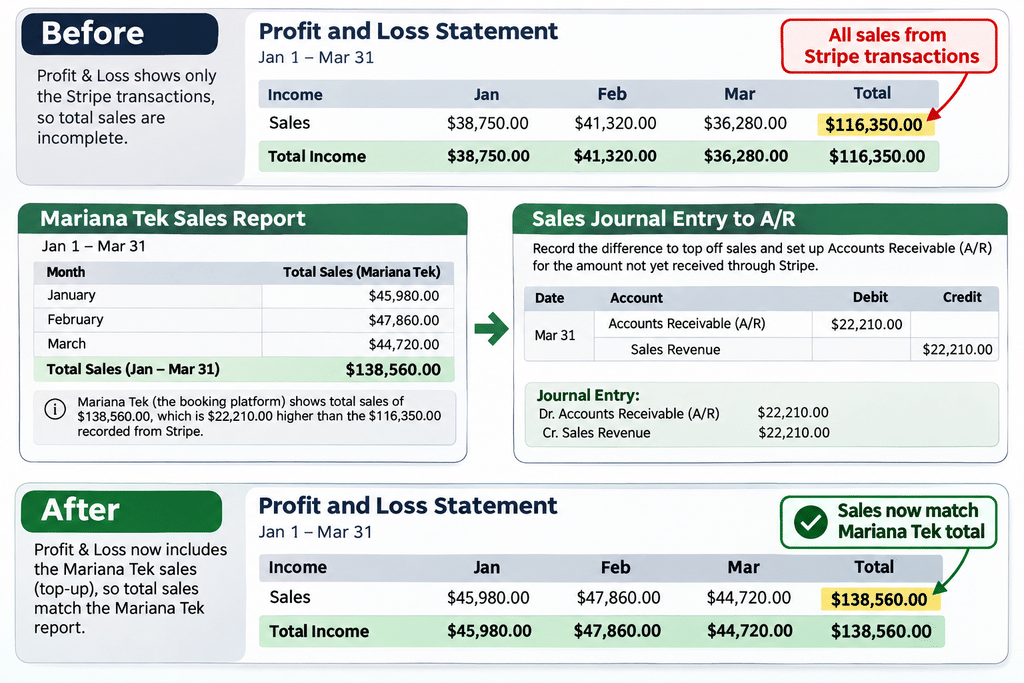
In the image above, you can see that in the before image, the sales from Jan 1 to Mar 31 are from Stripe. Sales were $116,350. However when we checked the Mariana Tek sales report, the sales were $138,560. This means we need to add an extra $22,210.00 to the sales. We did this by creating a journal entries to record the unpaid sales. We debited accounts receivable $22,210 and credited Sales for the same amount. In the after image, you can see that the sales for the period match the Mariana Tek totals for that same period.
Importing Mariana Tek Sales Reports as Invoices in Quickbooks
Once the sales issues from Jan to March was fixed, we used Mariana Tek as the source to record sales from April to the end of the year. Rather than using Stripe transactions from the bank feed as sales, we uploaded the Mariana Tek transactions into QuickBooks Online as invoices. Mariana Tek had a lot of reports. We used the Sales by Location – UTC report to upload the sales we needed into the invoice module in Quickbooks.
This approach established a customer-level record of sales and amounts owed. Each invoice provided a transaction against which a corresponding Stripe payment could be matched, without needing to record the same sale again.
Import Stripe transactions and match payments to Mariana Tek invoices
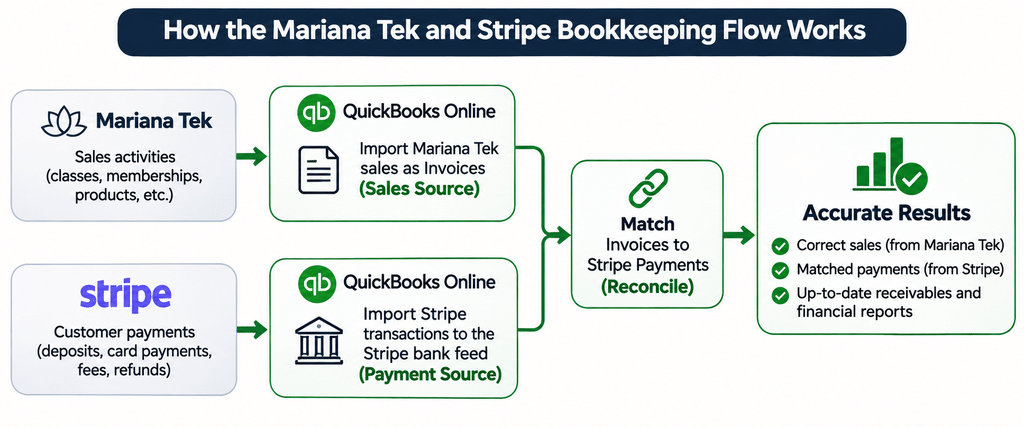
Once we uploaded the Mariana Tek reports as invoices into Quickbooks, we then uploaded the Stripe transactions into the Stripe bank feed in QuickBooks Online. This allowed us to use Stripe as the payment source and Mariana Tek as the sales source, rather than treating both platforms as independent sources of revenue.
Here is how things would flow:
How we matched the payments
We matched the Stripe payments to the corresponding Mariana Tek invoices in QuickBooks. This allowed paid invoices to be cleared from accounts receivable without recording additional sales.
The distinction between gross customer payments and net Stripe payouts is important. When uploading the Stripe transactions we uploaded the gross payments and the fees separately; as opposed to simply uploading the net payments. This is because the processing fees are charged only by stripe and do not reflect what the customer paid. It also allows us to match the invoices exactly to what the customers paid which will be show as the gross amount in the Stripe report. The processing fees were then categorized on their own to an expense account.
What about the Stripe Payouts?
These would be transfers from the Stripe account into the clients bank account. The Stripe account used to upload the bank feed was enough to handle these transactions.
Illustrative Mariana Tek invoice and Stripe payment reconciliation
The example below illustrates how a customer payment reduces accounts receivable while the processing fee and payout affect the Stripe clearing account. The amounts are illustrative, not actual client figures.
| Transaction movement | Amount |
| Mariana Tek invoice recorded | $100 |
| Stripe payment matched to invoice | ($100) |
| Outstanding accounts receivable | $0 |
| Stripe processing fee | ($3) |
| Net Stripe payout to bank | $97 |
| Remaining Stripe clearing balance | $0 |
Establish accurate accounts receivable and Stripe clearing balances
Once the Mariana Tek invoices and Stripe payments were matched, the business had a more reliable view of customer balances and the movement of funds through Stripe. Now, it was up to us to track the receivables,
Accurate Mariana Tek accounts receivable
Matching payments against invoices allowed the studio to distinguish paid sales from outstanding customer balances. The accounts receivable report became a more useful record of amounts still owed.
Using this aged receivables report, we were able to show the owners which clients had not yet paid for their invoices.
Better insight into the Stripe account
The Stripe bank feed provided visibility into payment activity independently of the Mariana Tek sales records. This made it easier to understand why the amount processed by Stripe might differ from the amount deposited into the bank.
For example, a $100 customer payment with a $3 processing fee results in a $97 net payout. The $100 payment clears the invoice, the $3 is a processing expense, and the $97 is a transfer from Stripe to the bank. These figures are illustrative and exclude sales tax.
Up-to-date profit and loss reporting
With Mariana Tek invoices serving as the sales records and Stripe payments matched against them, we were able to provide the yoga studio with up-to-date sales figures on its profit and loss statement for the cleanup period.
A clearer bookkeeping process moving forward
The completed cleanup established a clear distinction between the roles of Mariana Tek, Stripe and QuickBooks Online. Both platforms provide useful reports, but their transactions should not automatically be recorded as separate sales.
When a sale is recorded in Mariana Tek
The recommended ongoing process is to import the sales transaction from Mariana Tek as an invoice in QuickBooks Online, preserving the customer balance and appropriate sales information.
When a payment is processed through Stripe
Import the Stripe payment activity and match the customer payment to its corresponding invoice. Review processing fees, refunds and payouts separately, as applicable, rather than posting the net deposit as another sale.
At month end
Review outstanding Mariana Tek invoices, unmatched Stripe payments and the Stripe clearing account balance. Compare the sales figures in QuickBooks with the underlying Mariana Tek records to identify discrepancies before finalizing monthly reports.
At a Glance
Business type:
Yoga studio
Support Provided:
Core bookkeeping.
One year of QuickBooks Online bookkeeping cleanup.
Invoice tracking.
Finance email management.
Extensive bill/receipt management
Estimated Price:
Cleanup and bill/receipt management: $50/hr
Core bookkeeping: $450/month
Finance email management: $160/month
Accounts Receivable: $160/month
Total: $750 per month + $50/hr
How we worked together
Fully remote
Bookkeeping Professional
Samuel, Owner, Paperless Books
Facing a similar situation? Let’s solve it together.
Need Monthly Bookkeeping Services?
Paperless Books provides remote bookkeeping and cleanup support for Canadian yoga studios and other businesses using Mariana Tek, Stripe and QuickBooks Online.